從google alert傳來gameQuery這東西。
標題寫著「javascript game development made easy」,也試玩了demo的game,只能說真是了不起,不過真派的上用場嗎??目前是0.4版,再觀察吧,或許0.9、1.0版時,真的會很不錯。
2010年3月17日 星期三


2010年3月10日 星期三
多國語言的代碼"- or _"及大小寫問題
多國語言的代碼常見的幾個狀態,zh-tw、zh-TW、zh_TW、tw,那麼我應該使用那一種呢?
通常若是用了某個套件,就會依其要求的去處理,但目前遇到二至N個系統要同步一致,總應該有個標準,或轉換方式,才能使其一致呀。而問題在"- or _"及大小寫。
參考到此篇「W3C - Language codes,ISO 639 語言代碼,ISO 3166 標準國家代碼,ISO 4217 貨幣代碼」文章,說明了W3C有相關定義。
language-code = primary-code ( "-" subcode )*
primary-code︰為 ISO 639 兩個字母的語言縮寫。
subcode︰為 ISO 3166 國家代碼
例如︰繁體中文為中華民國、台灣(tw)在使用,那麼繁體中文的語言代碼就可以定義為(zh-tw);簡體中文為中華人民共和國(cn)在使用,所以簡體中文的語言代碼定義為(zh-cn)。
這解決了"- or _"的問題,不過大小寫還是沒有得到解答。
相關資料︰
W3C 全球資訊網聯盟
Wikipedia - 全球資訊網聯盟
W3C - 8.1.1 Language codes
ISO 國際標準化組織的官方網站
Wikipedia - 國際標準化組織
Wikipedia - ISO 639
Wikipedia - ISO 639-1
Wikipedia - ISO 3166
Wikipedia - ISO 3166-1
Wikipedia - ISO 4217
通常若是用了某個套件,就會依其要求的去處理,但目前遇到二至N個系統要同步一致,總應該有個標準,或轉換方式,才能使其一致呀。而問題在"- or _"及大小寫。
參考到此篇「W3C - Language codes,ISO 639 語言代碼,ISO 3166 標準國家代碼,ISO 4217 貨幣代碼」文章,說明了W3C有相關定義。
language-code = primary-code ( "-" subcode )*
primary-code︰為 ISO 639 兩個字母的語言縮寫。
subcode︰為 ISO 3166 國家代碼
例如︰繁體中文為中華民國、台灣(tw)在使用,那麼繁體中文的語言代碼就可以定義為(zh-tw);簡體中文為中華人民共和國(cn)在使用,所以簡體中文的語言代碼定義為(zh-cn)。
這解決了"- or _"的問題,不過大小寫還是沒有得到解答。
相關資料︰
W3C 全球資訊網聯盟
Wikipedia - 全球資訊網聯盟
W3C - 8.1.1 Language codes
ISO 國際標準化組織的官方網站
Wikipedia - 國際標準化組織
Wikipedia - ISO 639
Wikipedia - ISO 639-1
Wikipedia - ISO 3166
Wikipedia - ISO 3166-1
Wikipedia - ISO 4217
2009年12月19日 星期六
Facebook auto receive gifts
When your facebook gift is too much, You can use the automatic tool.
Use the Firefox + Selenium Add-on.
Firefox is a browser. such as IE; Opera; Google Chrome.
Selenium is a tool. Is firefox add-on. The tool can auto control a web pages. For web developers is automatic test.
* Install Firefox & Run.
* Install the Selenium Add-On. (Using Firefox open the Selenium page. Click 'Add to Firefox' button)
* Download the file 'AcceptGift.test' used to receive gifts. (Please right-click -> "Save As")
* Click Firefox -> Tools -> Selenium IDE, Then opened the Selenium.
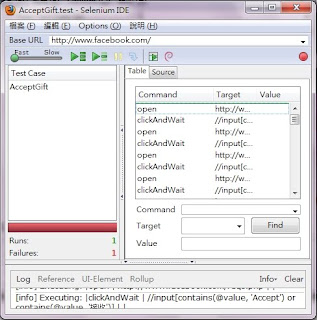
* Click Selenium-> File -> Open, Choose the 'AcceptGift.test'.
* Click the "Green Arrow with Dash" button to run, then begin to accept gift.
* If stop or many gifts is waiting. just click to run again.
ps. You must already agree the game of gift.
ps.2. In AcceptGift.test. Two lines is receive one gift. So you can copy & paste for more gifts.
Use the Firefox + Selenium Add-on.
Firefox is a browser. such as IE; Opera; Google Chrome.
Selenium is a tool. Is firefox add-on. The tool can auto control a web pages. For web developers is automatic test.
* Install Firefox & Run.
* Install the Selenium Add-On. (Using Firefox open the Selenium page. Click 'Add to Firefox' button)
* Download the file 'AcceptGift.test' used to receive gifts. (Please right-click -> "Save As")
* Click Firefox -> Tools -> Selenium IDE, Then opened the Selenium.

* Click Selenium-> File -> Open, Choose the 'AcceptGift.test'.
* Click the
"Green Arrow with Dash" button to run, then begin to accept gift.* If stop or many gifts is waiting. just click to run again.
ps. You must already agree the game of gift.
ps.2. In AcceptGift.test. Two lines is receive one gift. So you can copy & paste for more gifts.
2009年12月11日 星期五
facebook自動收禮物
facebook收到的禮物太多,收的很累嗎?自動收禮物幫助您。
一個簡單的方法,使用Firefox + Selenium。
要開始的可直接看後段步驟。
Selenium是一個用來自動操作網頁的工具,對網頁開發者而言,可以做自動測試。
這不是幫你玩遊戲,不算機器人,只是禮物太多了,而且收禮物常要來來回回按來按去的,有時很慢又要等很久。
當然其實這個Selenium當然不只能收禮物,還能...
幫你收錢,放進銀行,還有幫你按任務等等,不過我沒有放出下載,
每個人玩的遊戲不同嘛,也不知有無違反遊戲的規則。
這也算是推廣Firefox嗎?? cc...
ps.必需是已同意的遊戲收禮物才會成功喔,否則該禮物會出現同意畫面,然後就繼續收下一個禮物了。
ps.2.在Selenium中AcceptGift.test的內容,兩行就是收一個禮物,所以也可以多複制幾組,一次就可多收些禮物,當然中間要順利,有時網頁會有狀況發生,造成停止。
一個簡單的方法,使用Firefox + Selenium。
要開始的可直接看後段步驟。
Selenium是一個用來自動操作網頁的工具,對網頁開發者而言,可以做自動測試。
這不是幫你玩遊戲,不算機器人,只是禮物太多了,而且收禮物常要來來回回按來按去的,有時很慢又要等很久。
當然其實這個Selenium當然不只能收禮物,還能...
幫你收錢,放進銀行,還有幫你按任務等等,不過我沒有放出下載,
每個人玩的遊戲不同嘛,也不知有無違反遊戲的規則。
這也算是推廣Firefox嗎?? cc...
- 先安裝Firefox。
- 完成後使用Firefox安裝Selenium Add-On。(請按Add to Firefox按鈕)
- 下載用來接收禮物的檔案AcceptGift.test。(請按右鍵->另存)
- 按Firefox->工具->Selenium IDE,就打開Selenium了。
- 按Selenium->檔案->Open,再去選擇下載的AcceptGift.test。
- 再按下"箭頭+一條橫線"的按鈕來執行,就開始收禮物啦。
- 如果沒收完或停住了,只要再按一次執行就OK了。
ps.必需是已同意的遊戲收禮物才會成功喔,否則該禮物會出現同意畫面,然後就繼續收下一個禮物了。
ps.2.在Selenium中AcceptGift.test的內容,兩行就是收一個禮物,所以也可以多複制幾組,一次就可多收些禮物,當然中間要順利,有時網頁會有狀況發生,造成停止。
2009年12月4日 星期五
html include html,兩種工具介紹與比較。
沒有Server Side的支援,又不想用iframe,想用html include html。
這裡提供兩個選擇,
1.inc-5(jQuery Plugin):inc: A super-tiny client-side include JavaScript jQuery plugin
2.jQuery UI - Tabs
先說明第2個,jQuery UI - Tabs,你可以只做一頁,有頭有尾,包函css等,然後用Tab的方式,當按下Tab時,會去載入該頁內容,而該頁只需是沒頭沒尾、乾淨的、只有內容的html code。
優:網頁內容單獨維護,乾淨簡單。
缺:搜尋引擎找到內頁內容時,你只能讓人看到白白的純HTML。
inc-5,網頁中就有範例。實做上有兩種大方向:
1.同jQuery UI - Tabs,只做一個page,onclick時再動態載入需要的內容。
2.每個page獨立,可以用javascript的方式,動態載入header或footer之類include用的檔案。
個人還沒有實做,但猜想:每個Page可以用最簡單的方式,但或許要包函一點必備的html頭尾及inc-5等,其它的網頁頭尾用inc-5,網頁其它設定及需求,都用js動態載入動態處理,或某些可寫在header.inc中。
這裡提供兩個選擇,
1.inc-5(jQuery Plugin):inc: A super-tiny client-side include JavaScript jQuery plugin
2.jQuery UI - Tabs
先說明第2個,jQuery UI - Tabs,你可以只做一頁,有頭有尾,包函css等,然後用Tab的方式,當按下Tab時,會去載入該頁內容,而該頁只需是沒頭沒尾、乾淨的、只有內容的html code。
優:網頁內容單獨維護,乾淨簡單。
缺:搜尋引擎找到內頁內容時,你只能讓人看到白白的純HTML。
inc-5,網頁中就有範例。實做上有兩種大方向:
1.同jQuery UI - Tabs,只做一個page,onclick時再動態載入需要的內容。
2.每個page獨立,可以用javascript的方式,動態載入header或footer之類include用的檔案。
個人還沒有實做,但猜想:每個Page可以用最簡單的方式,但或許要包函一點必備的html頭尾及inc-5等,其它的網頁頭尾用inc-5,網頁其它設定及需求,都用js動態載入動態處理,或某些可寫在header.inc中。
2009年11月19日 星期四
使用Ruby修改檔案內容
以下是使用Ruby修改檔案,主要目的是修改sympa(mailing list)中許多目錄(list)中的config檔案內容。
using ruby modify file content.
config的內容中找到"owner_include"區段將"profile normal"替換成"profile privileged"。
using ruby modify file content.
config的內容中找到"owner_include"區段將"profile normal"替換成"profile privileged"。
<--
Dir.chdir("/usr/local/sympa/expl")
Dir.glob("*-*").each do |x|
  if File::directory?(x)
    config_file = File.join(x, 'config')
    if File.exist?(config_file)
      puts config_file
      flag = false
      File.open(config_file, 'r+') do |f|
        out = ""
        f.each do |line|
          if line =~ /owner_include/
            flag = true
          elsif line =~ /^$/
            flag = false
          elsif flag == true
            if line =~ /profile normal/
              line = "profile privileged\n"
            end
          end
          out << line
        end
        #write to file
        f.pos = 0 #from line 1
        f.print out #write
        f.truncate(f.pos) #truncate after current position
      end
    end
  end
end
-->
2009年5月8日 星期五
各種版本IE的網頁測試
請出IETester,建立出一個多版本的IE測試環境。
可安裝在Windows 7, Vista and XP,可測試IE8, IE7 IE 6 and IE5.5。
這可比弄好幾套OS簡單的多了。
IETester is a free WebBrowser that allows you to have the rendering and javascript engines of IE8, IE7 IE 6 and IE5.5 on Windows 7, Vista and XP, as well as the installed IE in the same process.
可安裝在Windows 7, Vista and XP,可測試IE8, IE7 IE 6 and IE5.5。
這可比弄好幾套OS簡單的多了。
IETester is a free WebBrowser that allows you to have the rendering and javascript engines of IE8, IE7 IE 6 and IE5.5 on Windows 7, Vista and XP, as well as the installed IE in the same process.
訂閱:
文章 (Atom)